 AskBee by Divi Solution
Live chat that lives on your own site
AskBee adds a friendly chat button to your WordPress site. Visitors ask a question, and you reply from an inbox inside your dashboard. No external account, no third-party servers, no monthly fee.
Click the chat button
This is a preview of the AskBee widget. Open it, read a quick answer, or send a message. Replies here are scripted and nothing is sent anywhere.
Everything a small team needs to talk to visitors
A chat widget your visitors will like, and an inbox that feels at home in WordPress.
Floating chat widget
A chat button and popup with your name, photo, greeting, colour and position.
Inbox in wp-admin
Conversation list with unread badges, search, open / closed tabs and smart filters.
Your data, your site
Chats live in your own database. No external account, servers or monthly fee.
Never miss a message
Email, sound and desktop alerts anywhere in wp-admin, plus an unread count in the tab title.
Office hours
Set your weekly hours. When you are away, visitors can still leave a message for later.
Auto-reply & canned replies
An automatic first answer, plus saved replies you insert with one click.
Attachments & emoji
Images and PDFs in both directions, a formatting toolbar and an emoji picker.
Chat ratings
Visitors rate closed chats 👍 or 👎 with a comment, and bad ratings email you.
Easy to start, easy to come back to
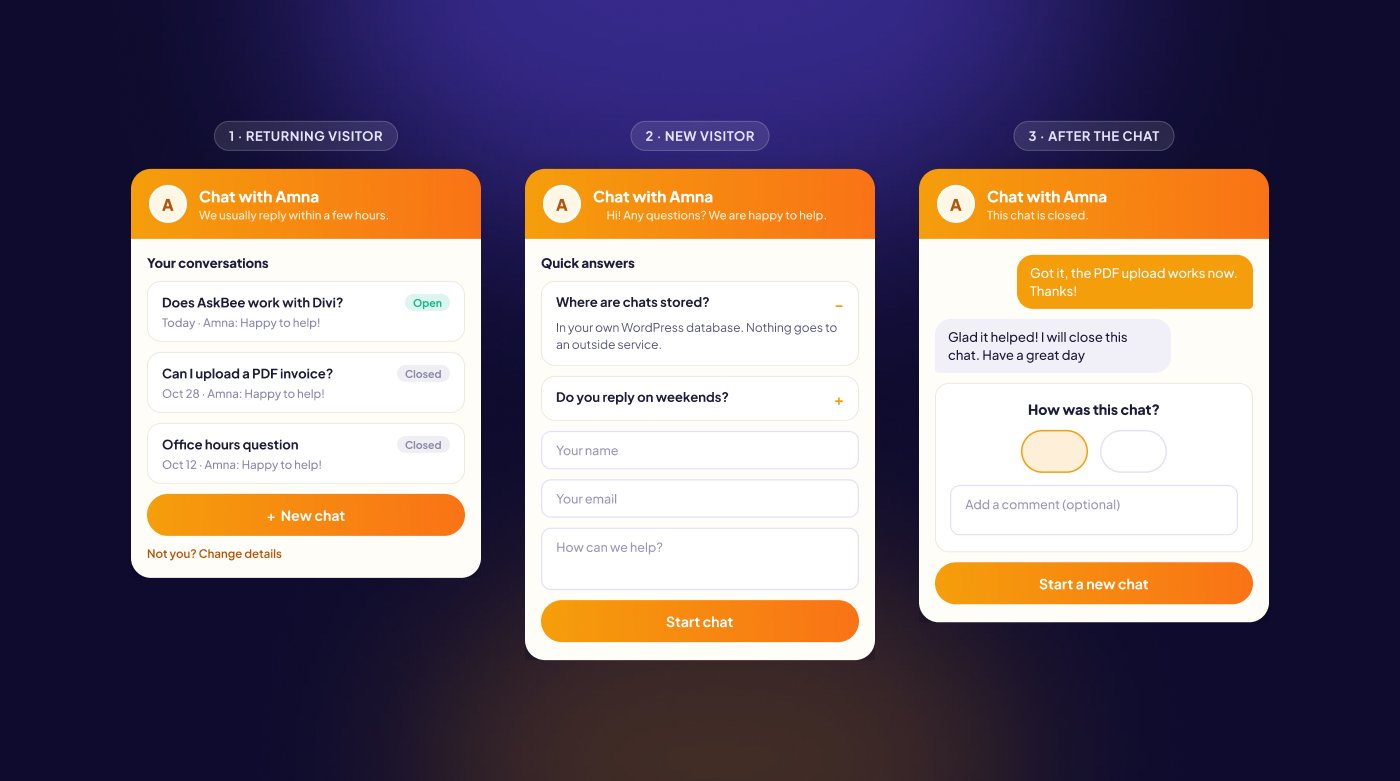
New visitors see your quick answers and a short form. Returning visitors see their previous chats and start a new one without typing their details again.
New visitors
Quick answers to read first, then a short form: name, email and question.
Returning visitors
Their last 10 chats, newest first. Open chats continue, and a new chat needs only a message.
After the chat
Closed chats become read-only, with an optional 👍 / 👎 rating and comment.
One inbox, right inside WordPress
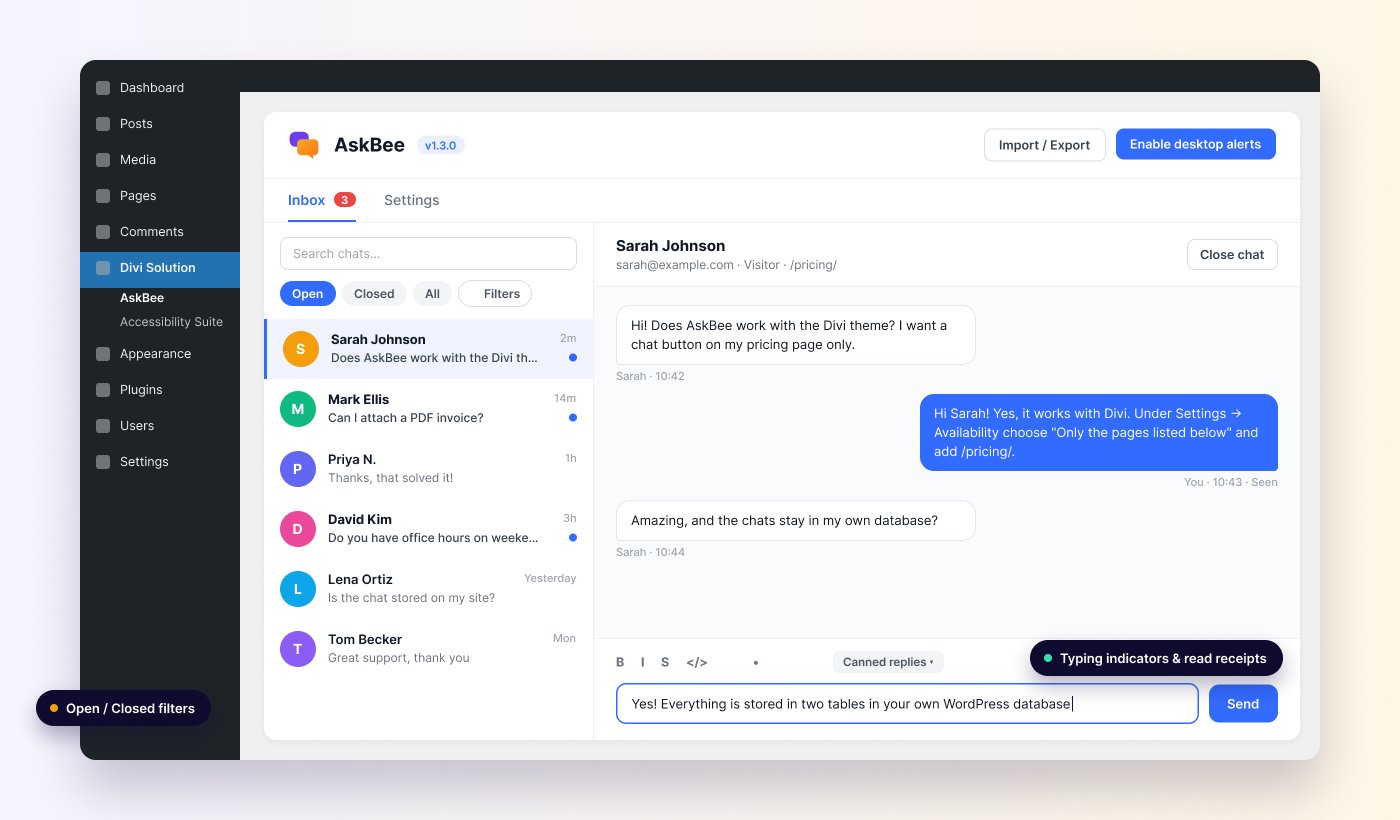
Find AskBee under the Divi Solution menu. The Inbox and Settings live on one page, with the same clean design as our Divi Accessibility Suite.
- Open, Closed and All tabs, search by name or email
- Filter by rating, guests or registered users, unread only, and group by visitor
- Typing indicators and “Seen” read receipts on both sides
- When a visitor has left, your reply is emailed to them
- Logged-in users skip the form and continue their chats on any device
Own your conversations
Most chat tools send every message through their servers and charge per seat, every month. AskBee keeps it simple.
| AskBee | Typical hosted chat service | |
|---|---|---|
| Where chats are stored | Your database | Their servers |
| Monthly fee | None | Often per agent |
| External account needed | No | Yes |
| Third-party scripts on your pages | No | Yes |
| Works on shared hosting | Yes | Yes |
| Personal data export and erase | Built into WordPress tools | Separate process |
AskBee is coming soon
AskBee: live chat for WordPress
Launching soon
Pricing will be announced at launch
- Self-hosted: no external account or monthly fee
- Works with Divi and any WordPress theme
- Requires WordPress 6.2+ and PHP 7.4+
- Works with page caching and on shared hosting
Send us a message and we will email you when AskBee is available.
Frequently asked questions
Where are the chats stored?
In two tables in your own WordPress database. Nothing is sent to an outside service. Emails are sent through your site’s normal mail setup.
Is it real-time?
The widget and inbox check for new messages every few seconds while they are open, which works on any hosting plan without WebSockets.
Does it work with Divi?
Yes. AskBee works with the Divi theme and any other WordPress theme, and with page caching plugins. It is a regular WordPress plugin, not a Divi module, so there is nothing to add in the Builder.
Can visitors send files?
Yes, if you allow it. Visitors and you can send images (JPG, PNG, GIF, WebP) and PDFs, with a size limit you choose.
What happens when I’m offline?
Turn on office hours and AskBee shows you as away outside your hours. Visitors can still leave a message, and your reply is emailed to them if they have left the site.
When will AskBee be released?
Soon. Send us a message through the contact form and we will let you know as soon as it is available.
Be the first to try AskBee
Tell us you’re interested and we’ll email you on launch day.